KYC attestation
Send a KYC invitation from your backend, deliver it by email, and let the customer complete verification on your website — under your brand, on your domain. ChainIT runs the sensitive screens; you keep the relationship and the UX.
This guide covers attestation-style hosted actions for KYC invites (related membership flows use the same embed pattern).
Step 1 of 5
Authorized signer
Your team enters the customer’s details in your web app — for example, an onboarding portal under your brand.
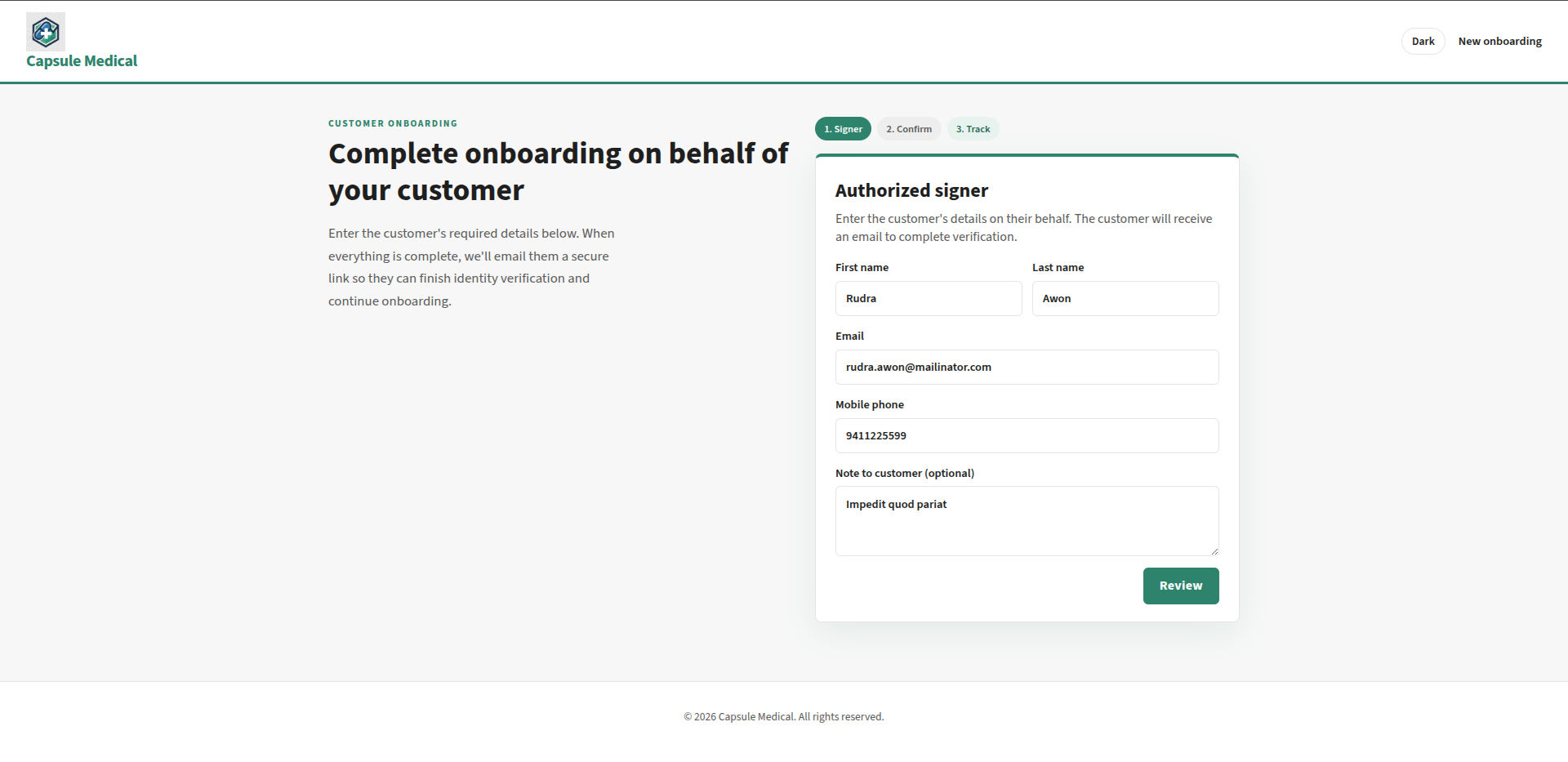
The tour combines portal and email screenshots (steps 1–3) with the Task Management → KYC → Invitation branding preview (steps 4–5) — the same screen you configure in the Developer Portal. Wire the live flow with HostedInvite on your invite landing page.
What your business gets
| Outcome | Why it matters |
|---|---|
| Your domain, your brand | The customer stays in your trust boundary for the invite journey. |
| One SDK package | Use a Hosted Action application (hostedUiType: HOSTED_ACTION) on your invite landing — separate from your login portal app. Mount HostedInvite when the URL carries ?code=. |
| Mobile without a separate app | Desktop users who cannot use a webcam can finish via QR when your flow supports it. |
| Auditable completion | Track invites and outcomes with KYC APIs and your existing ops workflows. |
Backend lifecycle (create invite, resend, status): How KYC works.
Implementation checklist
- Hosted Action application in the Developer Portal — action page URL + branding (Hosted Action). Use a different app than your Hosted Auth login portal.
- Server-side session — browser calls your BFF for
client-session; never exposeclientSecretin the front end. - Invite landing page — read
?code=from the URL and renderHostedInviteinsideHostedUiProvider. - Create invites — your server calls Add KYC invite; email links hit your resolver, then your page with
code.
Minimal React shape:
import { HostedUiProvider, HostedInvite } from "@chainitservices/hosted-ui";

export function InviteLanding({ linkCode }: { linkCode: string }) {
return (
  <HostedUiProvider config={yourHostedConfig} embedLayout>
    <HostedInvite
      linkCode={linkCode}
      onComplete={(result) => {
        /* accepted / declined — refresh your UI or call your API */
      }}
      onError={(err) => console.warn(err.message)}
    />
  </HostedUiProvider>
);
}
Identity proof on the action path uses a single phone screen (no sign-up link); initiate sends authAction: "auto" when app-config reports HOSTED_ACTION. Details: Hosted Action — app-config.
Provider setup, session BFF, and branding: Hosted UI integration.
Related
- Hosted Action — portal mode, deeplinks,
HostedInvite - Hosted UI integration — provider, session, branding
- How KYC works — invite lifecycle